FastHTML in practice: finding the right fit
When to use FastHTML and when to switch to Django
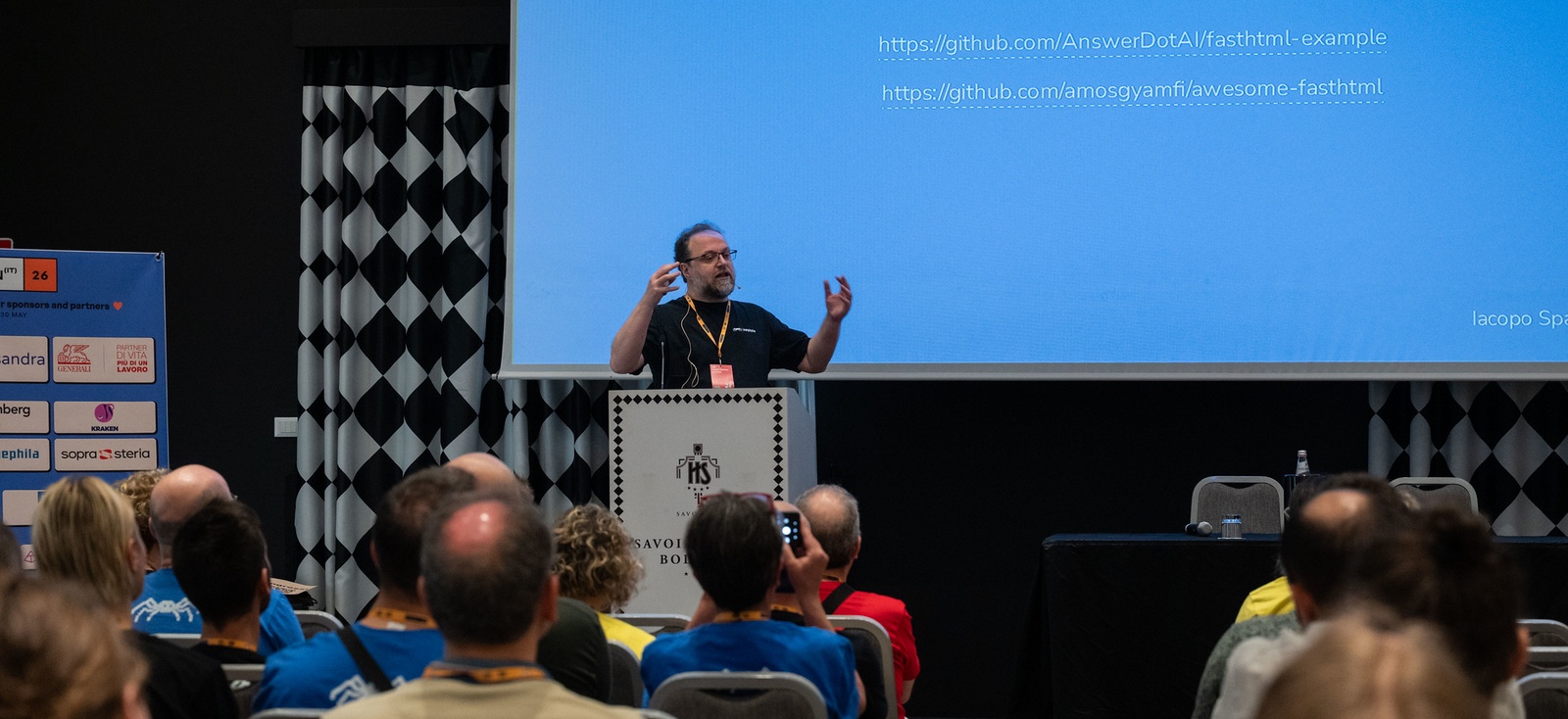
In May 2026 our CTO and Solution Architect, Iacopo Spalletti, gave a talk on FastHTML at PyCon Italia in Bologna. This article draws on it and shows how the framework held up on one of our projects, and where it stopped. For a closer look at the code, from MiniDataAPI queries to streaming Claude’s responses, the video, the slides and the example app are linked below.
Talk: FastHTML, applicazioni HTML in modo Pythonico
Speaker: Iacopo Spalletti, CTO and Solution Architect at Nephila
Event: PyCon Italia 2026, Bologna, May 28, 2026
Language: Italian
Video: Watch on YouTube
Slides: Speaker Deck
Example app: yakky/FastHTML-example, a Claude chat built with FastHTML
The internal tool that outgrew FastHTML
At Nephila we needed a small internal tool to store tokens and credentials for our different projects. We'd been keeping them in Bitwarden and wanted something more structured. The data model was simple and linear, which made it a good place to try FastHTML on a real project.
The first version went well. MiniDataAPI, the small data layer that ships with FastHTML, covered everything we needed, authentication was handled by an external gateway and the code was very simple. We were happy.
Then, as always, the requirements grew. We had to support more use cases, the data model became far more complex and we needed a permission system on top of it. That pushed us past what MiniDataAPI can do. The next step would have been SQLAlchemy, and at that point we asked ourselves why we were making things harder: Django already gives us all of that. So we moved to Django, and we have no regrets about starting with FastHTML.
The lesson I took from it is the one I closed the talk with. With a simple model, FastHTML was the right choice. With a complex model and permissions, it stopped being one. The trick is telling the two apart before you're halfway through a project.
Know your data model before you choose your framework.
Two of everything for one application
Python developers are good at writing elegant, well-tested Python. Then the application needs a button that does something, even something trivial, and the frontend quietly becomes someone else's problem.
On the backend the choice is familiar: Django, Flask or FastAPI, depending on what the project needs. When you build a rich frontend the list of technologies gets longer: templates in Jinja or the Django template language, an API built with DRF or FastAPI, a JavaScript framework such as React or Vue, npm for the packages, Vite for the build and usually a few more tools after that. Each choice makes sense on its own. Added together, they're often too much for the application at hand. The bill, for a single application, is two languages, two mental models, two ecosystems and two dependency systems.
This is how most of the web is built today, and most Python developers have accepted it as the price of building for the web. The dominant pattern is easy to describe: the backend returns JSON, JavaScript assembles the interface and the only contract holding the two sides together is the API description.
The contract also has a cost that never shows up in the code. Backend and frontend are often in the hands of different people, and they must keep their work aligned. On a large application that effort pays for itself. On an internal tool, a dashboard or a prototype, it's hard to justify.
Which brings me to the question I asked on stage: is all of this always necessary?
The web was right all along
The original model of the web dates back to 1991: HTTP and HTML, with the server returning HTML and the browser rendering it. It has worked for more than thirty years. Browsers are very good at rendering HTML, and HTTP is flexible enough to carry interactions far more complex than a page of links. We call this now the Hypermedia model.
We moved away from that model because we wanted richer interactions, and for a long time explicitly managed JavaScript was the only way to build them. That's no longer true.
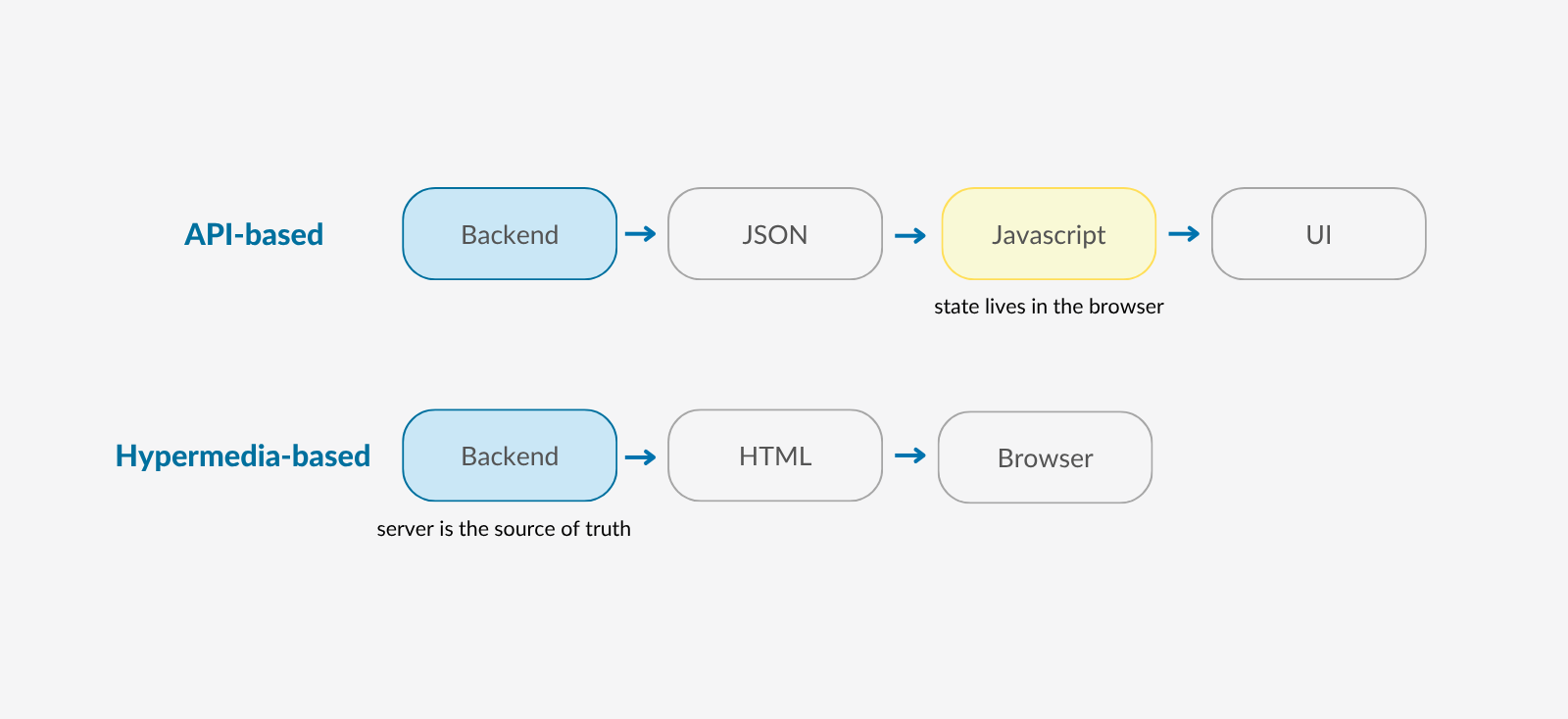
The difference that matters most is where the state lives. With hypermedia there's no client-side state to manage, which has always been a source of headaches, and the server stays the source of truth. Take the example app I built for the talk, a chat with Claude. When you clear the conversation, the server sends back an empty page and the browser shows it. No code in the browser has to work out what changed.
What makes this practical today is HTMX, the missing piece. It's a JavaScript library of around 14 KB that needs no build step and no framework. With it, any DOM element can send a request on any event, with any HTTP method, and the response replaces only the part of the page that needs to change.
For the developer, the shift shows up in the question you ask yourself while you build:
How do I manage client state?
What HTML should the server return?
If you want the theory behind this, the book I pointed to in the talk is Hypermedia Systems, by Carson Gross, Adam Stepinski and Deniz Akşimşek. FastHTML is built on exactly this idea.
What FastHTML gives you out of the box
FastHTML takes that idea and builds a Python framework around it. Answer.AI released it in 2024, so it's still young. It's built on Starlette, uses HTMX as a structural part of the framework and borrows its style from FastAPI, applied to hypermedia applications. It's async-native, and the library itself is about a thousand lines of code with few abstractions, so you get productive quickly.
The core idea fits in one line. Every HTML tag is a Python function:
Div(P("Hello"))which produces:
<div><p>Hello</p></div>Route handlers (views if you are familiar with django) return the UI directly. There are no templates, and no switching between Python, HTML and JavaScript while you work.
This is the minimal app from the example I built for the talk, the chat with Claude:
from fasthtml.common import (
    H1, Button, Div, Form,
    Link, Style, Textarea,
    fast_app, serve,
)

app, rt = fast_app(
    hdrs=[
        Link(rel="stylesheet", href=PICO_CDN),
        Style(OVERRIDES),
    ]
)

@rt("/")
def get():
    return _page(history)

serve(port=5001)
You import the tags you need, create the app with fast_app (here passing a stylesheet in the headers), declare a route with the @rt decorator, FastAPI style, and start the server with serve().
The snippets in this article are excerpts from the example app. Names like _page, history and PICO_CDN are defined elsewhere, and the full code is in the repository.
Interactivity comes from HTMX attributes, passed as keyword arguments. This is the button that clears the conversation, and the route behind it:
Button(
    "Clear conversation",
    hx_post="/clear",
    hx_target="body",
    hx_swap="outerHTML",
)

@rt("/clear", methods=["POST"])
def post_clear():
    history.clear()
    return _page(history)
hx_post says which endpoint to call on click, hx_target which element the response replaces and hx_swap how to replace it. The /clear route empties the history and returns the page. Here the whole body gets replaced. In other apps you'd swap only a fragment.
You click, a request is sent to the server, the backend returns an HTML fragment, the DOM is updated: the whole processing cycle stays in Python.
FastHTML also provides the basic pieces you are going to need to start building. There are sessions and authentication, a small data layer called MiniDataAPI and PicoCSS for base styles, though you can load any CSS framework you like. And there's basic support for WebSockets and Server-Sent Events, for real-time features that go further than HTMX does on its own.
Put together, that's enough for a single developer to build a complete internal tool, with no frontend build and no second codebase. What the box doesn't contain matters just as much, and that's where our internal tool ran into trouble.
When FastHTML stops being the right fit
FastHTML's limits are easy to see in advance, and most of them are there by design. The first one is the data layer. MiniDataAPI uses SQLite by default and reading data looks like this:
todos(where="done=0")                              # filtered
todos(order_by='created_at')                       # sorted
todos(limit=10, offset=20)                         # paginated
todos(where="done=0", order_by='task', limit=5)    # combined
That's close to the whole vocabulary. There are lookups by primary key, a persistent filter for per-user data and the usual insert, upsert and delete. There are no joins and no annotations. With one or two tables that's plenty. With fifteen tables and a lot of joins, you end up doing the work in Python and lose most of what made FastHTML attractive. You can plug in SQLAlchemy, and if you know it well that works, but you've just replaced a big piece of the framework.
When we had to grow our internal tool past the initial requirements, we hit that wall pretty quickly:
the data model grew well beyond a couple of tables
we needed a permission system on top of it
MiniDataAPI was no longer enough, and SQLAlchemy was the next step
Then there's what was out from the start. There's no admin, which anyone coming from Django will miss on day one: in an internal tool, every screen Django would give you for free is a screen you build yourself. There's no full ORM and no migrations, so every change to the schema is yours to manage by hand. And there's no asset fingerprinting or cache busting, so making sure browsers pick up the new version of your CSS is also on you.
The ecosystem is small, too. The project is young, there are few plugins and few answers on Stack Overflow, and when you get stuck it takes longer to find someone who's hit the same problem.
One thing I can't tell you yet is how it holds up at scale. With dozens of pages and complex components, readability depends on how well you structure those components, and I haven't tested FastHTML on a project that size.
Between Streamlit and Django
In the talk I placed FastHTML in the gap between two tools most Python developers already know. Streamlit also lets you build applications quickly and entirely in Python, but it's very opinionated: what you build is a Streamlit app, inside Streamlit's own model. Django has plenty going for it, and it takes real effort to master. FastHTML sits in the middle.
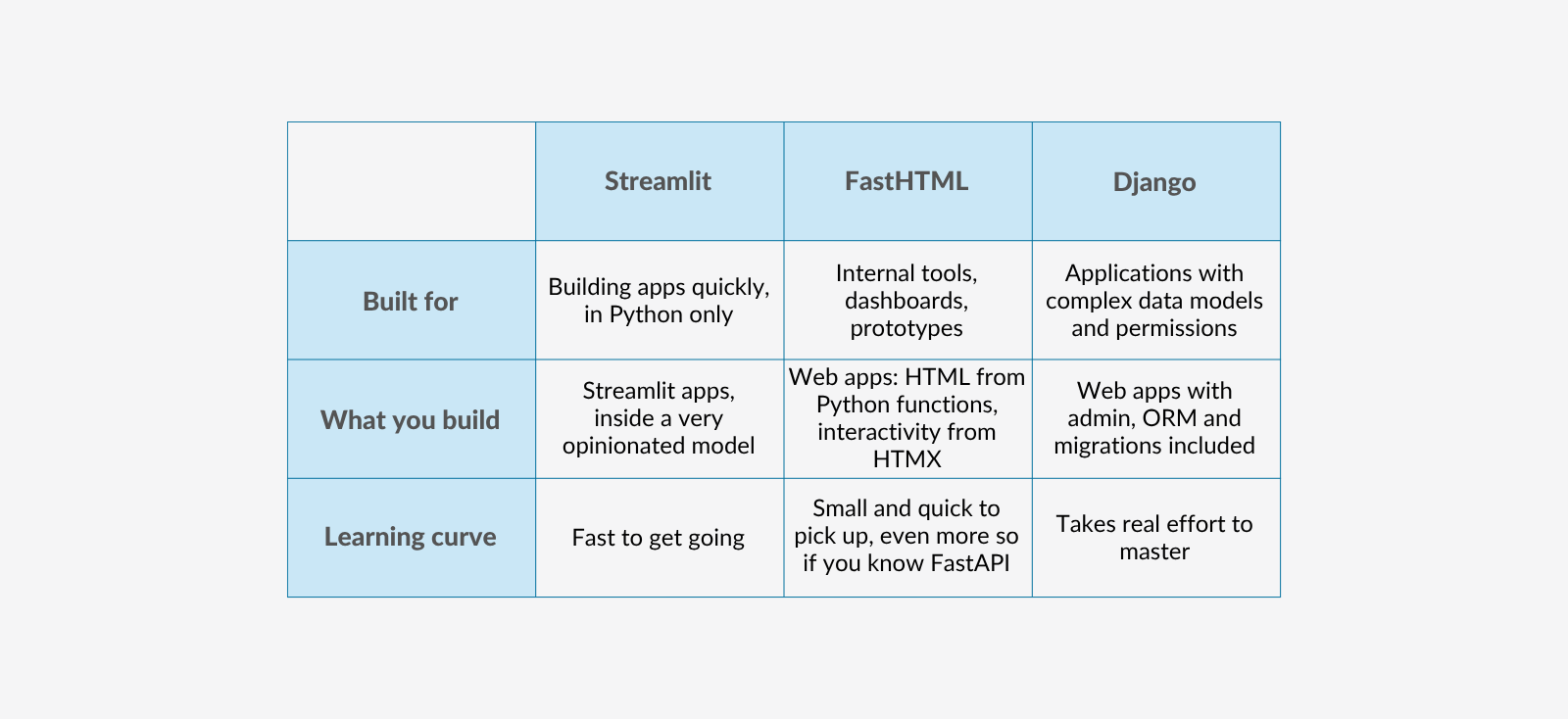
In practice, this is how I'd choose:
If it's an internal tool, a dashboard or a prototype with a simple data model, and one or two people are building it, FastHTML is a good fit.
If the data model is complex, needs permissions or is clearly going to grow, start with Django. That's where our internal tool ended up anyway.
If you know FastAPI, FastHTML will feel familiar from the first route.
If the complex data already lives in another backend, FastHTML can still work as a view on top of it. It doesn't try to own the database: a dataclass that maps the existing table is enough.
Small enough to fit in an AI's context
The small size that makes the ecosystem thin also has an upside. A library of about a thousand lines, with few abstractions, fits easily in the context of an AI model, so the model has less to guess and less to get wrong.
In my experience that shows. The example app from the talk came almost entirely from a single prompt, and it worked as intended on the first run. The code it generated had very few hallucinations. With a good prompt, a dashboard, a simple admin or a basic chatbot can take minutes.
I'd keep that claim in proportion. It holds for small applications, which is exactly what FastHTML is for. But for an internal tool that one person needs to put together quickly, building it almost entirely with AI is a realistic option, and I count that as a point in FastHTML's favor. The example repository is there if you want to read the result and judge it yourself.
***
Resources
For more on the topics covered here:
The slides on Speaker Deck
htmx andHypermedia Systems, for the hypermedia side
h2f, which turns existing HTML into FastHTML code, handy if you're starting from a theme you already have
AnswerDotAI/fasthtml-example andawesome-fasthtml, for more examples and components
This article focuses on one of the topics in the talk: choosing FastHTML as a framework. To see the more technical parts in detail, here’s a chapter index of the video:
MiniDataAPI in detail (12:00): queries, safe filtering, persistent filters and database backends
Background tasks (18:58)
Streaming Claude's responses with Server-Sent Events (19:55)
If you want to dig deeper into the topics of the talk, the best place to start is the example app Iacopo built for it:yakky/FastHTML-example. If you'd rather try FastHTML from scratch, start from the official documentation.
Did you find these resources useful, or want to share your thoughts on FastHTML? Join the conversation on our LinkedIn page: sharing ideas and comparing perspectives is the part we enjoy most.
***
We wrote this article with the support of AI. If you're interested in how we use these tools as part of our writing process, you can read more here.